 Video Delay
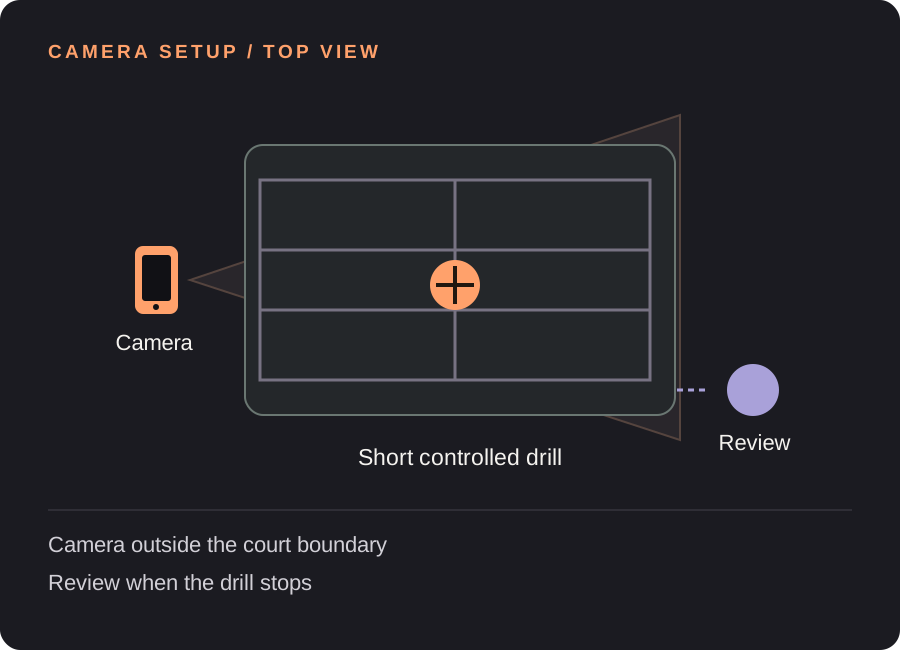
Set up your pickleball replay station
Choose a short block
Agree on a beginning and end: one serve or a small number of controlled feeds. An open-ended rally does not give you a predictable moment to watch the screen. Start with a block that fits a saved clip if you intend to keep it.
Frame feet and paddle together
Make sure the view includes the player’s stance, reach and recovery as well as the paddle. For a dink drill, check the near-net movement; for a serve, check the complete preparation and finish. Keep the camera fixed across the block.
Respect both players’ space
Place the support outside the playing and run-out areas with the other player’s agreement. Choose the viewing position before you start. Avoid framing neighboring courts when you only need one practice station.
Build the pause into your timing
For a 10-second drill and 4 seconds to stop and look, try 16 seconds including a 2-second margin. Test one block. If you keep feeding while trying to watch, shorten the drill and create a clear review pause instead.
Find your starting delay. Movement time + time to finish and look + a little margin. Open the free delay planner with this guide’s example. These are starting examples, not measured recommendations for every athlete or room.
A useful loop for the next few attempts
Pick one visible question
Use a cue from your coach or practice plan, such as a recovery position. This is visual review from a single camera, not automatic shot classification or a personalized coaching system.
Run the block, then stop
Finish the agreed number of feeds. Both players should know when the drill has ended before anyone turns toward the screen. Watch the same block together if the screen position allows it.
Keep an example when useful
Save after the chosen sequence finishes on the delayed view. If it runs beyond 30 seconds, use a normal recording or shorten the block; do not expect the saved-rep limit to expand with the delay.
Need the controls first? Walk through the app screens, or read how to save and review a rep.
When the setup does not quite work
| What you notice | What to change |
|---|---|
| The drill never ends at a consistent time | Use a fixed number of feeds and a clear stop before reviewing. |
| The paddle is visible but the feet are not | Widen the frame to include stance and recovery. |
| I want automatic scoring or shot tags | Those are different features. This app provides camera replay and manual clip review. |
Pickleball replay questions
Can it analyze dinks automatically?
No. It can show a short dink drill on a delay, but you or your coach decide what to look for.
Does it work without court Wi-Fi?
The on-device delayed camera does not require an internet connection. AirPlay and external display connections have their own requirements.
Can I use the same setup for a game?
You can frame a wider scene, but a short controlled drill is easier to time and review. Use a normal recording to keep an entire game.
Before the next session
This guide covers camera setup and review workflow. It is not a sport lesson or a claim that a specific setup improves performance. Clips, camera angles and manual drawings need your own interpretation.
Make the next rep easier to see.
Video Delay runs on iPhone and iPad with iOS or iPadOS 17 or later. Choose a 1–60 second delay, then save selected 5, 10, 15 or 30 second reps for slow motion, frame stepping and manual drawings. No automatic form score.
Get Video Delay on the App StoreOne-time paid download. Apple shows your local price before purchase. No subscription or in-app purchases. See the illustrated app walkthrough.