 Video Delay
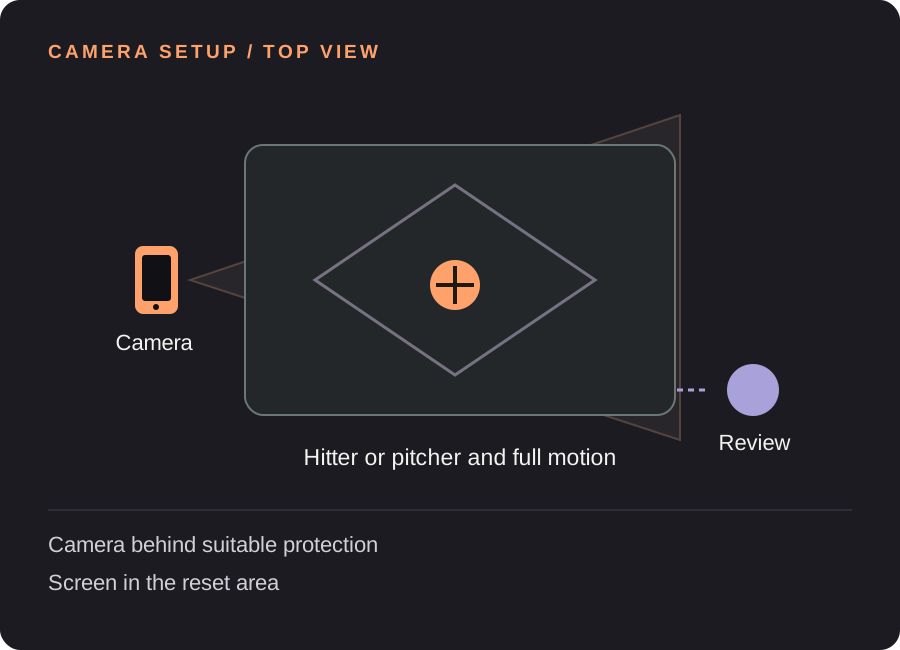
Set up your baseball & softball replay station
Choose batting or pitching for the station
Set one clear filming goal for the drill. Keep the camera fixed across attempts and use the same part of the cage or throwing lane so the view stays comparable. Change the setup deliberately when switching from a hitter to a pitcher.
Cover the whole bat or delivery
Rehearse the highest reach and the finish while checking the frame. Leave room for the bat beyond the hands and for the pitcher’s stride and follow-through. A portrait crop that fits a standing athlete can still miss the useful motion.
Keep the device protected and out of traffic
Use an appropriate protected position for the practice environment, outside the bat path and ball path. Do not put a phone or viewing athlete in an active throwing lane. Agree on a review spot before the drill begins.
Time the reset
Allow the athlete to complete the rep and reach the review position. For a 5-second rep and a 4-second reset, try an 11-second delay including 2 seconds of margin. Test with the actual drill and adjust if the first part plays too early.
Find your starting delay. Movement time + time to finish and look + a little margin. Open the free delay planner with this guide’s example. These are starting examples, not measured recommendations for every athlete or room.
A useful loop for the next few attempts
Name the cue before the rep
Choose a visible checkpoint with your coach. The purpose is a quick look at a specific question, not an automatic diagnosis of a swing or delivery.
Review during the reset
Complete the rep and stop in the agreed review position. Let the clip play through before the next attempt so the player knows which repetition is on screen.
Save a useful example
After the complete rep appears on the delayed screen, save a clip long enough to include setup and finish. Slow playback and manual drawing can make a checkpoint easier to discuss afterward.
Need the controls first? Walk through the app screens, or read how to save and review a rep.
When the setup does not quite work
| What you notice | What to change |
|---|---|
| The bat or throwing hand disappears | Reframe with a full-motion rehearsal before restarting the drill. |
| The screen is hard to see through the net | Use a practical viewing position or a compatible external display outside the active area. |
| I need to import and compare existing clips | That is a saved-video analysis task. Use a dedicated review app rather than treating a delayed camera as a full video editor. |
Baseball & softball replay questions
Does it measure pitch or exit velocity?
No. Video Delay does not measure ball speed, pitch movement, launch angle or exit velocity.
Does it work for softball too?
Yes, the delayed camera workflow can be used for softball drills. Adapt the camera position and timing to the actual hitter or pitcher rather than copying a baseball setup blindly.
Can I send a rep to a coach?
You can keep a selected rep and use the app’s available save/export workflow. Review the saved file before sharing, and get permission from anyone else shown. This guide does not promise that every export path includes your drawings.
Before the next session
This guide covers camera setup and review workflow. It is not a sport lesson or a claim that a specific setup improves performance. Clips, camera angles and manual drawings need your own interpretation.
Make the next rep easier to see.
Video Delay runs on iPhone and iPad with iOS or iPadOS 17 or later. Choose a 1–60 second delay, then save selected 5, 10, 15 or 30 second reps for slow motion, frame stepping and manual drawings. No automatic form score.
Get Video Delay on the App StoreOne-time paid download. Apple shows your local price before purchase. No subscription or in-app purchases. See the illustrated app walkthrough.