 Video Delay
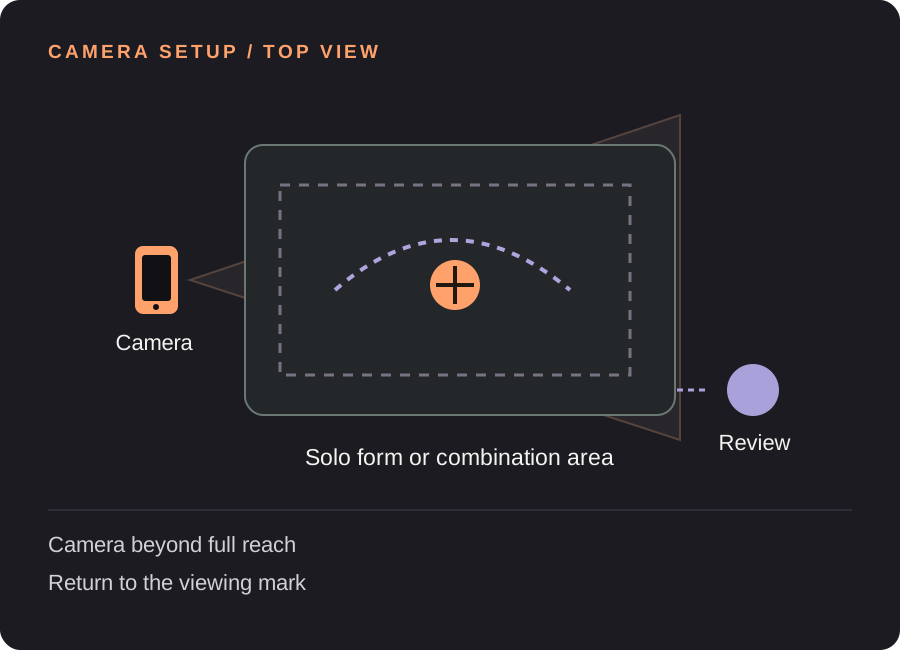
Set up your martial arts replay station
Allow room for the full reach
Check the widest stance, highest reach and furthest travelling step. Hands and feet should stay visible throughout the chosen passage. Keep the support outside the movement area and clear of pads, bags or other moving equipment.
Decide which perspective to keep
Check left and right with a simple hand raise. A mirror-like view can feel different from the view of someone facing you. Pick the perspective that fits your instructor’s cue and keep it consistent across attempts.
Break a long form into passages
Choose a section with a clear start and finish that you can review without interrupting movement. A 10-second passage and 4 seconds to return to the screen suggest a 16-second delay with a 2-second margin. Use a normal recording to keep a long complete form.
Set one repeatable starting mark
A starting mark helps keep position and framing consistent. Walk through the passage first, then check the delayed view before performing at your ordinary practice pace.
Find your starting delay. Movement time + time to finish and look + a little margin. Open the free delay planner with this guide’s example. These are starting examples, not measured recommendations for every athlete or room.
A useful loop for the next few attempts
Choose one checkpoint with your instructor
Keep the question visual and specific. A two-dimensional replay cannot determine impact force, judge an effective technique or replace feedback from an instructor.
Complete the passage before looking
Finish and settle before reviewing. For this station, use a solo drill with a clear pause; do not try to watch the replay while engaged with a partner.
Save a short sequence
Once the finish has played on the delayed screen, save enough footage to include the passage. Use slower playback or frame stepping to discuss a position, while remembering that camera perspective affects apparent angles.
Need the controls first? Walk through the app screens, or read how to save and review a rep.
When the setup does not quite work
| What you notice | What to change |
|---|---|
| A kick or extended hand is clipped | Test the largest movement and move the camera farther back or reframe. |
| Left and right feel confusing | Check orientation deliberately before the block, then keep it unchanged. |
| The full form exceeds the saved clip | Choose a shorter passage or record the full form with a normal camera. |
Martial arts replay questions
Can it help me review kata or forms?
It can show a short selected passage after you complete it. You or your instructor choose what to observe; the app does not grade the form.
Does it measure punch speed or power?
No. The replay is not a calibrated measurement of speed, power, force or distance.
Can I use it during sparring?
This guide is designed around solo forms and controlled practice with a clear review pause. A complete sparring recording is better handled by a normal camera workflow and your instructor’s filming rules.
Before the next session
This guide covers camera setup and review workflow. It is not a sport lesson or a claim that a specific setup improves performance. Clips, camera angles and manual drawings need your own interpretation.
Make the next rep easier to see.
Video Delay runs on iPhone and iPad with iOS or iPadOS 17 or later. Choose a 1–60 second delay, then save selected 5, 10, 15 or 30 second reps for slow motion, frame stepping and manual drawings. No automatic form score.
Get Video Delay on the App StoreOne-time paid download. Apple shows your local price before purchase. No subscription or in-app purchases. See the illustrated app walkthrough.